How to build a UK data protection complaint form on Squarespace
! This blog post contains affiliate links. If you make a purchase through these links or using my discount code I may receive a small commission (at no cost to you). I only ever recommend a service or business that I feel is helpful to you and that I have used or would use myself.
If you are a UK business, you need to meet the new data protection complaints requirements coming into force on the 19th June 2026, including giving people a way of making a complaint against you on how you are handling their data.
In this blog post I will be focussing on what this means for your website and how you can create a simple complaint page and form to direct people to. As a Squarespace designer and template shop owner, I will be using Squarespace as my example using my Nerina website template to demonstrate, but the same principles should apply to whatever web builder you use.
Before we dive in - the content of this blog post and video is for informational purposes only, and I am not a legal professional and this is not legal advice.
I will however direct you to further information regarding these changes below.
New requirements under the Data (Use and Access) Act - the right to complain
Under the Data (Use and Access) Act, one element coming into force on Friday 19th June 2026 is the right for individuals to complain about how an organisation or small business handles their data.
What does this mean for UK small businesses?
As outlined by the Information Commissioners Office, as business owners we must “give people a way of making data protection complaints to you [and] acknowledge receipt of complaints within 30 days of receiving them.”
Just to be clear, this is not to do with a complaint against your service or your product; this is strictly about how you handle their personal data. Because of this, you need a policy in place and a direct way for people to reach out to you to make a complaint.
The right to complaint is not the only change. Various changes have come into play, more of which you can find out on Lucy Legal’s ‘GDPR is Changing’ blog. Huge thank you to Lucy for raising awareness about this - she is a great person to follow (instagram.com/lucy_legal) for legislation changes, as it can be hard for us business owners to keep up with everything.
Why you might need a dedicated complaints contact form
If you are worrying about how people can reach out to you, you don't need to.
You can use your existing email address or contact form. If you want to create a specific contact form to direct people to, it’s easy to do by duplicating an existing form on your website to use as a dedicated landing page.
First you’ll need to update your Privacy Policy.
In case you are not familiar, it is a legal requirement to have a Privacy Policy/Notice on your website if you are obtaining or holding anyone’s personal data (such as name and email address) - examples of how you main obtain data include: using a contact form, online calendar or booking systems and/or a newsletter sign up or lead magnet on your web site.
And now this needs to include a compliant Complaints Policy, once you have created a complaints process if you don’t already have one in place.
I purchased my Privacy Policy from Lucy Legal as part of her template bundle. The great thing about Lucy’s templates is that she includes any updates for free so you can make sure that your Privacy Policy is up to date. If you’d like help with getting the right policies then you may wish to look the same *Privacy Policy I use from Lucy Legal. Use the discount code ‘sammyphillips10’ for 10% off.
Step-by-Step: How to create your complaint form in Squarespace
Step 1: Duplicate your contact page
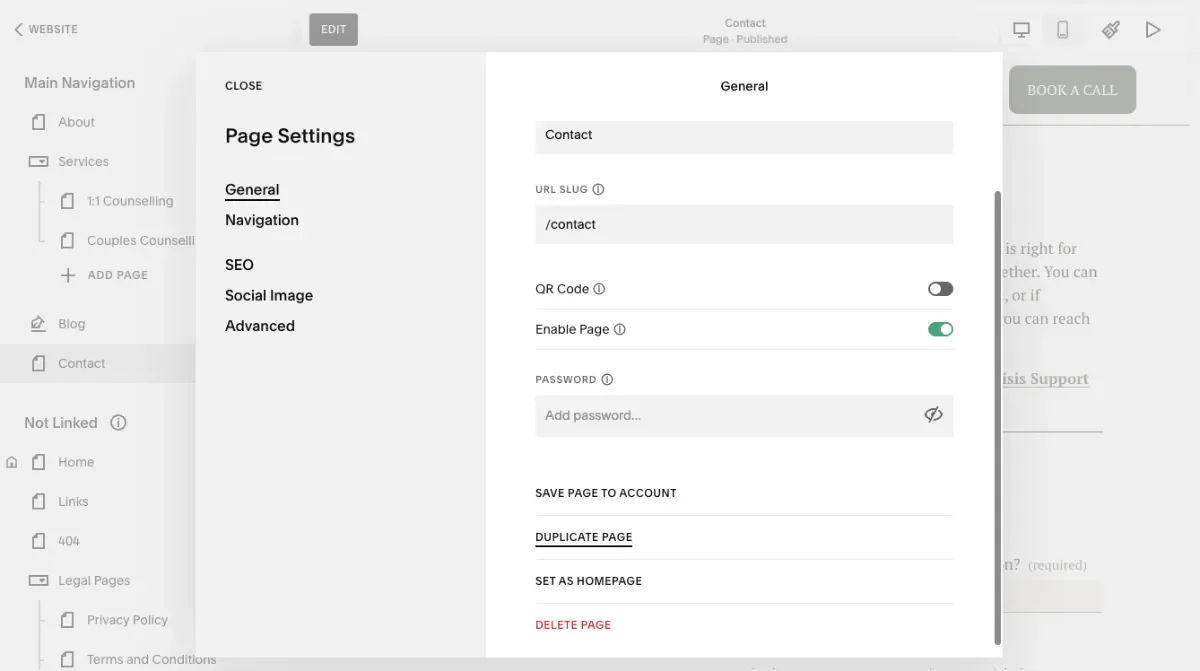
Go to your pages, find your contact page, and click into settings.
Scroll down, click Duplicate Page, and confirm. This will pop a copy of the page into your "Not Linked" section.
While it’s highlighted, rename it straight away to Data Protection Complaint Form or something similar.
Step 2: Edit the form text and title
Now that everything is copied over, we can edit the page. You can keep this layout really straightforward.
Update the page header and text instructing people how they can get in touch by completing the form if they wish to submit a complaint
You should also acknowledge that you will respond to their complaint within 30 days, or less if that is what you have set out in your complaints process.
Next, change the name of the Squarespace form so you know that it relates to a Data Protection Complaint. Giving it a specific name ensures that when it comes through to your email inbox, it flags it to you straight away.
Step 3: Streamline the form fields
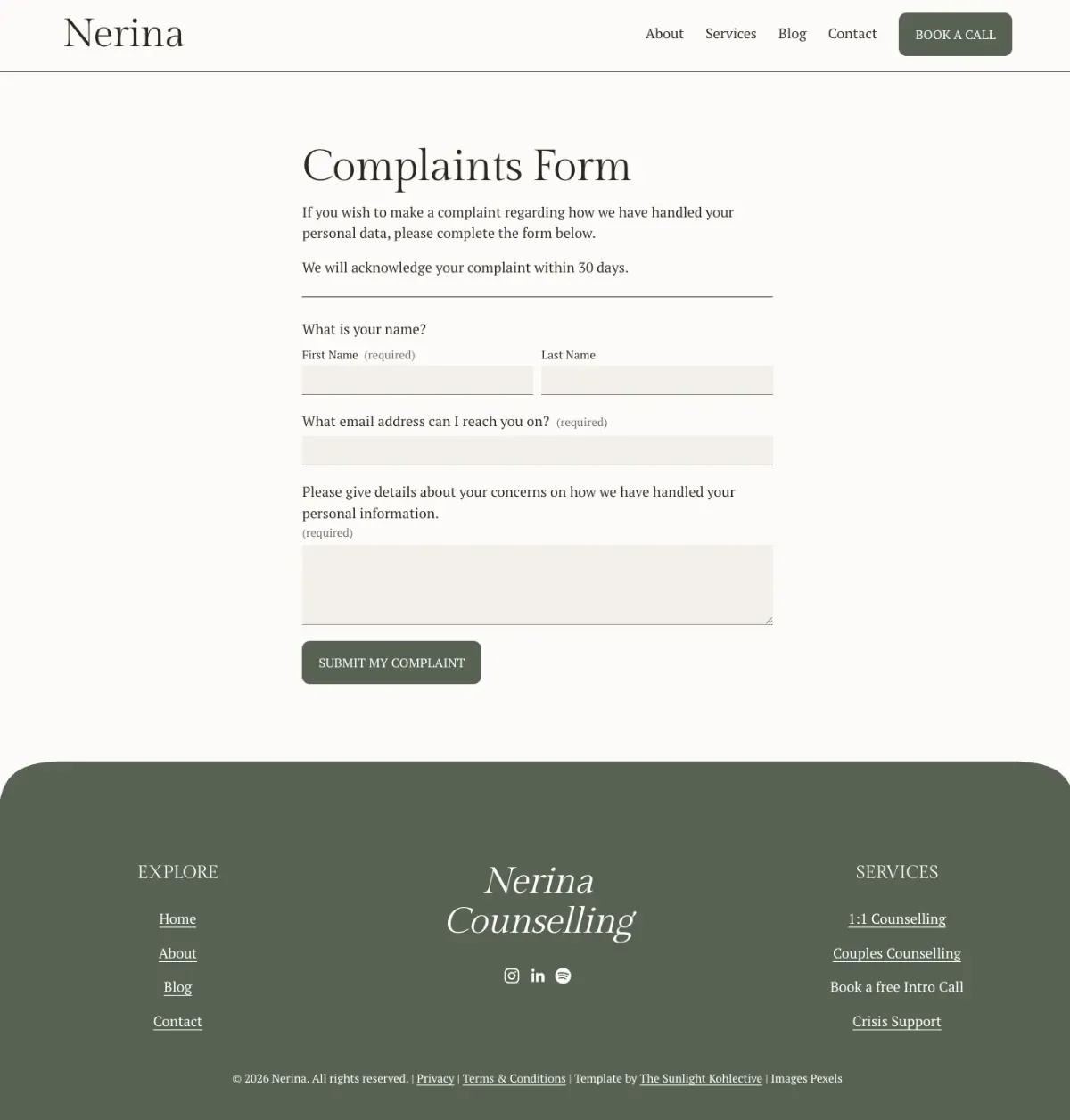
We want to keep the requested data minimal, but ensure we know exactly who is sending the complaint. Go into your form fields and adjust the following:
Name: Keep the first name required, and you can add a last name field and set it to ‘not required’.
Email Address: Keep this required so you can reply to them.
Remove Unnecessary Fields: Delete any generic fields like "How did you hear about me?" and retain a message field for people to outline their complaint.
Make sure your form storage settings are set so notifications go directly to your active business email address.
Step 4: Update your page URL and SEO Settings
Save and exit the page editor, then go into the page settings:
URL Slug: When you duplicate a page, it usually adds a number to the end of the URL. Change the URL slug to something clean and relevant, like /complaints. Make sure the page is enabled so it's live and accessible when you share the link.
SEO Settings: Go to the SEO tab and toggle the option to hide this page from search results. This page does not need to be indexed by search engines.
Step 5: Add the new page link into your Complaints Policy
Grab your new link (your domain name followed by /complaints (or whatever you changed the page URL to)
Head over to your Privacy Policy page, find your complaints section and hyperlink to the complaints form.
Now you have a streamlined, compliant way to manage data protection complaints seamlessly.
Further Information
For more information on the Data (Use and Access) Act 2025 see the Information Commissioner’s Office website: https://ico.org.uk/about-the-ico/what-we-do/legislation-we-cover/data-use-and-access-act-2025/
For further legal templates, including the newly updated Privacy Policy see *Lucy Legal’s template shop. And don’t forget to use the discount code ‘sammyphillips10’ for 10% off.
Lucy has also written a blog post that explains how GDPR is changing.